코드카타-대충 만든 자판
#include <string>
#include <vector>
#include <map>
#include <algorithm>
using namespace std;

vector<int> solution(vector<string> keymap, vector<string> targets) {
    vector<int> answer;
    // Info: 각 문자가 나타나는 최소 클릭 횟수를 저장하는 맵 (key: 문자, value: 클릭 횟수)
    map<char, int> Info;

    // 1. 모든 키맵을 순회하며 각 문자별 최소 클릭 횟수 계산
    for(int i=0; i<keymap.size(); i++){ // 키맵의 개수만큼 반복
        for(int j=0; j<keymap[i].size(); j++){ // 각 키맵 내의 문자열 길이만큼 반복

            // 만약 이미 Info 맵에 해당 문자가 등록되어 있다면?
            if(Info.find(keymap[i][j]) != Info.end()){
                // 현재 저장된 횟수와 지금 새로 발견한 횟수(j+1) 중 더 작은 값을 저장
                Info[keymap[i][j]] = min(Info[keymap[i][j]], j + 1);
            }
            // 맵에 처음 등장하는 문자라면?
            else{
                // 현재 인덱스(j)는 0부터 시작하므로 클릭 횟수는 j+1로 저장
                Info.insert(make_pair(keymap[i][j], j + 1));
            }
        }
    }

    // 2. 타겟 문자열들을 순회하며 총 클릭 횟수 합산
    for(int i=0; i<targets.size(); i++){ // 만들어야 할 타겟 문자열 개수만큼 반복
        int cnt = 0; // 해당 문자열을 만들기 위한 누적 클릭 횟수

        for(int j=0; j<targets[i].size(); j++){ // 타겟 문자열의 각 문자 하나하나 확인

            // 맵에서 해당 문자를 찾을 수 있는지 확인
            if(Info.find(targets[i][j]) != Info.end()){
                // 찾았다면 미리 저장해둔 최소 클릭 횟수를 더함
                cnt += Info[targets[i][j]];
            }
            // 만약 키맵 어디에도 없는 문자라면?
            else{
                // 만들 수 없는 문자열이므로 결과값을 -1로 설정하고 반복문 탈출
                cnt = -1;
                break;
            }
        }
        // 최종 합산된 결과(혹은 -1)를 정답 벡터에 추가
        answer.push_back(cnt);
    }

    return answer;
}
분반 수업에서 배운 것
오늘 캐릭터나 행동에 사운드를 넣는 방법을 배웠다.
AnimNotify를 써서 했는데,
#pragma once

#include "CoreMinimal.h"
#include "Animation/AnimNotifies/AnimNotify.h"
#include "AttackAnimNotify.generated.h"

/**
 *
 */
UCLASS()
class CHAOSSOUL_API UAttackAnimNotify : public UAnimNotify
{
	GENERATED_BODY()

public:
	virtual void Notify(USkeletalMeshComponent* MeshComp, UAnimSequenceBase* Animation) override;
};
AttackAnimNotify.h
#include "AttackAnimNotify.h"
#include "Player/PlayerCharacterBase.h"
#include <Kismet/GameplayStatics.h>

void UAttackAnimNotify::Notify(USkeletalMeshComponent* MeshComp, UAnimSequenceBase* Animation)
{
	if (AActor* Actor = MeshComp->GetOwner())
	{
		if (APlayerCharacterBase* Player = Cast<APlayerCharacterBase>(Actor))
		{
			if (Player->WeaponType == EWeaponType::SWORD)
			{
				if (Player->AttackSound)
				{
					UGameplayStatics::PlaySound2D(GetWorld(), Player->AttackSound);
				}
			}

			else if (Player->WeaponType == EWeaponType::GREATSWORD)
			{
				if (Player->AttackSound)
				{
					UGameplayStatics::PlaySound2D(GetWorld(), Player->AttackSound);
				}
			}
		}

	}
}
AttackAnimNotify.cpp
public:
	EPlayerStates playerState = EPlayerStates::NONE;
	EWeaponType WeaponType = EWeaponType::NONE;

public:
	UPROPERTY(EditAnywhere, Category = "Sounds")
	USoundBase* AttackSound;
PlayerCharacterBase.h에 추가된 부분
void APlayerCharacterBase::Attack()
{
	playerState = EPlayerStates::ATTACK;//추가
	WeaponType = EWeaponType::SWORD;//추가
	UAnimInstance* AnimInstance = GetMesh()->GetAnimInstance();

	if (AttackMontage)
	{
		AnimInstance->Montage_Play(AttackMontage);


	}

	//람다 형식 : [캡처리스트](매개변수)->반환형 {실행코드};

	FTimerHandle AttackHandle;

	GetWorld()->GetTimerManager().SetTimer(
		AttackHandle,
		[this]()
		{
			playerState = EPlayerStates::NONE;
		}, 1.5f,
		false);
}
PlayerCharacterBase.cpp에 추가된 부분
그런데 공격 소리가 안 나와서 살펴봤더니

몽타주에 AnimNotify 넣기와
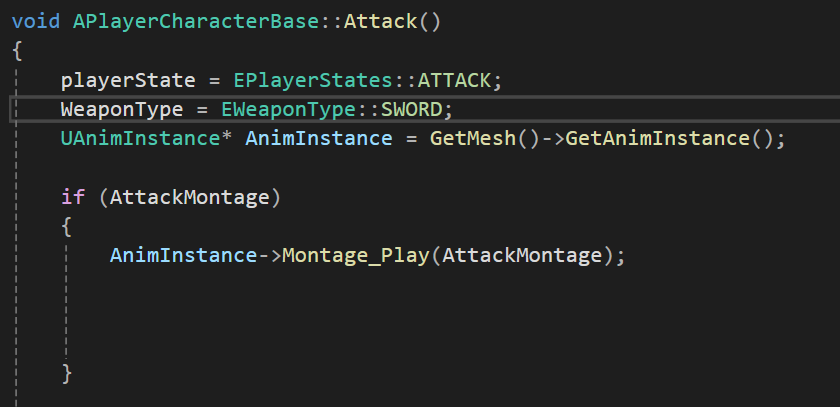
WeaponType 맞춰두기
를 하지 않았었기 때문이었다.
'TIL' 카테고리의 다른 글
| 3/16일자 TIL (0) | 2026.03.16 |
|---|---|
| 3월 13일자 TIL (1) | 2026.03.13 |
| 3/11일자 TIL (0) | 2026.03.11 |
| 3/10일자 TIL (0) | 2026.03.10 |
| 3/09일자 TIL (0) | 2026.03.09 |